

Disclosure: some links on this page are affiliate links. If you buy through them, AnyShop may earn a commission at no extra cost to you. It does not change our verdict.
Windows 11 already includes free antivirus, so the real question is not “do I need protection?” but “is Bitdefender vs Windows Defender a close fight, or is the paid suite clearly better?” In 2026 the answer is more interesting than most comparison pages admit: both products now score at or near the top of independent lab tests. The difference is in everything around the scanner.
In this guide we compare the latest AV-TEST and AV-Comparatives results, real features, performance, price, and who should pay for Bitdefender versus who can stay with Microsoft Defender for free.
Table of Contents
Bitdefender vs Windows Defender at a Glance
| Category | Bitdefender Total Security | Microsoft Defender |
|---|---|---|
| Price | Paid (first-year promo, higher renewal) | Free, built into Windows |
| AV-TEST score (Jul–Aug 2026) | 18 / 18 | 17.5 / 18 |
| AV-Comparatives Real-World (Feb–May 2026) | 99.5% protection, 5 false positives | 99.0% protection, 0 false positives |
| Password manager | Yes | No (browser-based only) |
| VPN | Yes, 200 MB/day per device (unlimited on higher plans) | No |
| Multi-layer ransomware protection | Yes, on by default | Controlled folder access, off by default |
| Platforms | Windows, macOS, Android, iOS | Built into Windows |
| Best for | Families, multiple devices, less technical users | Single, careful Windows 11 users |
Leaning toward Bitdefender? Check today’s first-year price and the current discount on the official site before you decide.
Check the current Bitdefender deal →
Affiliate link: AnyShop may earn a commission if you buy, at no extra cost to you.
1. Malware Protection: Independent Lab Results
Marketing claims are easy to make, so we look at independent labs. Here is how the two products compare in the most recent public tests.
AV-TEST (July–August 2026, Windows 11)
In AV-TEST’s latest Windows 11 home-user round, Bitdefender Total Security scored a perfect 18 out of 18, with 100% detection of both zero-day attacks and widespread malware. Microsoft Defender scored 17.5 out of 18: full marks for protection and usability, with half a point lost on performance.
AV-Comparatives Real-World Protection (February–May 2026)
In the AV-Comparatives Real-World Protection Test, Bitdefender blocked 99.5% of attacks (398 of 400), while Microsoft Defender blocked 99.0% (396 of 400). Both products received the top ADVANCED+ award.
Bottom line: Bitdefender has a small edge in raw detection, but Defender is no longer the weak free option it was a few years ago. For most people the protection gap is small; the bigger differences are features and convenience.
2. Performance: Which One Slows Your PC Less?
In the Bitdefender vs Windows Defender performance comparison, both products are light enough for everyday use. In AV-TEST’s July–August 2026 round, Bitdefender earned the full 6.0 performance score and Defender earned 5.5. In practice, Defender can feel slightly heavier when you install new programs or run a full scan, while Bitdefender is tuned to stay quiet in the background.
On an older laptop with a hard drive or 8 GB of RAM, that half point can be noticeable during big installs. On a modern SSD-based PC, most users will not feel a difference. If your PC is slow, first check if your PC has a virus, because the antivirus is rarely the main cause.
3. False Positives
False positives are another useful Bitdefender vs Windows Defender test. A false positive happens when antivirus blocks a safe file or website. In AV-TEST’s usability tests, both products recorded zero false warnings. In the AV-Comparatives real-world test, Defender recorded zero false positives, while Bitdefender recorded five. That is still a low number, but here Defender has the cleaner record.
4. Features: What You Get Beyond the Scanner
This is where the Bitdefender vs Windows Defender comparison stops being close. Microsoft Defender is a solid antivirus plus the security tools built into Windows. Bitdefender Total Security is a full security suite.
| Feature | Bitdefender Total Security | Microsoft Defender |
|---|---|---|
| Real-time antivirus | Yes | Yes |
| Firewall | Own firewall | Windows Firewall |
| Web and phishing protection | Yes, works across browsers | SmartScreen (strongest in Microsoft Edge) |
| Password manager | Included | Not included |
| VPN | 200 MB/day per device | Not included |
| Anti-tracker | Yes | Tracking prevention in Edge only |
| Webcam and microphone protection | Yes | Windows privacy settings |
| Parental controls | Yes | Microsoft Family Safety (separate) |
| System optimization tools | Yes | No |
If you would otherwise pay separately for a password manager or VPN, Bitdefender’s extras start to justify the subscription. For a deeper look at what each extra is worth, read our guide to antivirus features to compare.
5. Ransomware and Web Protection
In a Bitdefender vs Windows Defender comparison, ransomware is the threat that can cost you your files, so it deserves its own section.
- Microsoft Defender includes Controlled folder access, which stops untrusted apps from changing protected folders. It works well, but it is turned off by default, and many users never enable it.
- Bitdefender uses multi-layer ransomware protection that is active out of the box, plus a remediation feature designed to restore files affected by an attack.
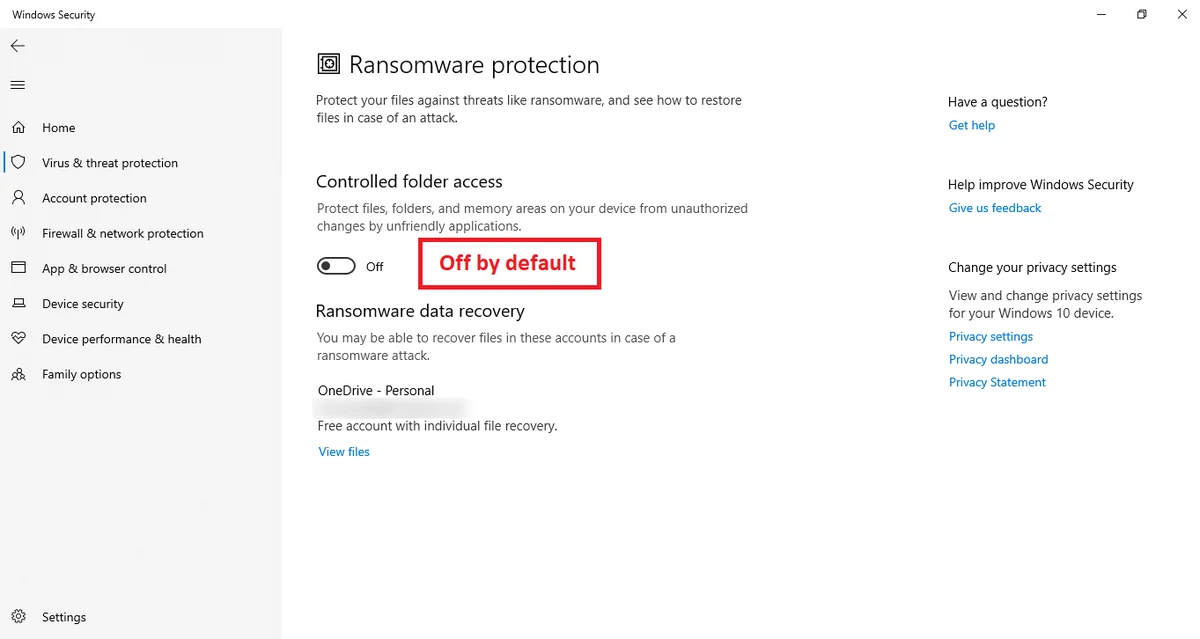
For web protection, Defender’s SmartScreen is strongest inside Microsoft Edge. If you use Chrome or Firefox, Bitdefender’s web protection gives more consistent coverage across browsers.
Want ransomware protection that is on by default? Bitdefender adds multi-layer ransomware defense, web protection, a password manager and coverage for several devices.
See Bitdefender plans and prices →
Affiliate link: AnyShop may earn a commission if you buy, at no extra cost to you.
6. Devices and Platforms
Microsoft Defender Antivirus is part of Windows, so it protects that one Windows PC. Bitdefender Total Security covers up to 5 devices on the individual plan and up to 25 on the family plan, across Windows, macOS, Android and iOS, all managed from one Bitdefender Central account.
If your household has a Windows laptop, a MacBook and a few phones, one Bitdefender subscription is simpler than combining different free tools on each device.
7. Price: Free vs Paid
Price is the clearest Bitdefender vs Windows Defender difference: Defender costs nothing, while Bitdefender is a subscription with a low first-year price and a higher renewal price. Approximate US prices reported in October 2026:
| Bitdefender plan | Devices | First year | Renewal |
|---|---|---|---|
| Antivirus Plus | 1–3 | $24.99–$39.99 | $49.99–$69.99 |
| Total Security | 5 | $59.99 | $109.99 |
| Premium Security (unlimited VPN) | 5 | $79.99 | $129.99 |
Prices change often, especially around Black Friday, so always confirm the current offer on Bitdefender’s site. Bitdefender also offers a 30-day money-back guarantee. Before you subscribe, it is worth understanding annual vs monthly software plans and how renewals work.
Who Should Choose Which?
Stay with Microsoft Defender if you:
- Use one Windows 11 PC and keep Windows Update on.
- Download software only from official sources.
- Already use a separate password manager and do not need a VPN.
- Are comfortable enabling Controlled folder access yourself.
Choose Bitdefender if you:
- Protect several devices, including Mac, Android or iPhone.
- Share the PC with children or less technical family members.
- Want ransomware protection and web protection that work without setup.
- Would pay for a password manager or VPN anyway.
Still undecided about Bitdefender vs Windows Defender? Our guides on whether you need antivirus for Windows 11 and free vs paid antivirus go deeper, and our full Bitdefender Total Security review covers every feature.
How to Switch From Defender to Bitdefender Safely
- Run a quick scan in Windows Security first (see quick scan vs full scan).
- Download Bitdefender only from the official website.
- Install it. Windows turns off Defender’s real-time protection automatically once Bitdefender is active, so you never run two real-time scanners.
- Open Windows Security and confirm Bitdefender is listed as your active antivirus provider.
- Run a first full scan in Bitdefender.
For the full process, follow our guide on how to switch antivirus safely. If you uninstall Bitdefender later, Microsoft Defender turns itself back on.
Frequently Asked Questions
Is Bitdefender better than Windows Defender?
In the latest independent tests, Bitdefender has a small lead in protection and performance, and it includes many more features. Windows Defender has a cleaner false-positive record and is free. For most families, Bitdefender is the more complete option; for one careful user, Defender is enough.
Is Windows Defender enough in 2026?
For many careful users, yes. In most Bitdefender vs Windows Defender lab results the gap is small. Microsoft Defender scored 17.5 out of 18 in AV-TEST’s July–August 2026 round and won ADVANCED+ in AV-Comparatives’ real-world test. Turn on Controlled folder access and keep Windows updated to get the most from it.
Can I run Bitdefender and Windows Defender together?
Not both in real time. When Bitdefender is installed, Windows automatically switches Defender’s real-time protection off to avoid conflicts. Defender comes back on if you remove Bitdefender.
Does Bitdefender slow down Windows 11?
Not noticeably on most PCs. Bitdefender earned the maximum 6.0 performance score in AV-TEST’s July–August 2026 test, slightly higher than Defender’s 5.5.
Is the free Bitdefender Antivirus better than Windows Defender?
Bitdefender Antivirus Free uses the same detection engine as the paid plans, but without most extra features. If you only want a scanner, the free version and Defender are both reasonable choices; the paid suite is where the real difference appears.
Final Verdict
The Bitdefender vs Windows Defender decision is no longer about whether the free option is “safe enough”; both protect very well. Choose Microsoft Defender if you are one careful Windows user who wants zero cost. Choose Bitdefender if you want stronger out-of-the-box ransomware and web protection, a password manager, a VPN, and one subscription for every device in your home.
Ready to upgrade from Windows Defender? First-year prices are usually discounted, and every plan has a 30-day money-back guarantee.
Affiliate link: AnyShop may earn a commission if you buy, at no extra cost to you.