

Disclosure: some links on this page are affiliate links. If you buy through them, AnyShop may earn a commission at no extra cost to you. It does not change our verdict.
Bitdefender is one of the few big antivirus brands that still gives away a real free product. That makes Bitdefender Free vs Paid a fair question: if the free version uses the same detection engine, why would anyone pay? The short answer is that the free app protects one Windows PC very well, while the paid plans add the layers that catch what a scanner alone can miss: ransomware file recovery, a firewall, safer banking, a password manager, a VPN and coverage for your phone and Mac.
In this guide we compare exactly what Bitdefender Antivirus Free includes, what each paid plan adds, how much they cost in 2026, and who can safely stay free.
Table of Contents
Bitdefender Free vs Paid at a Glance
| Feature | Bitdefender Antivirus Free | Bitdefender paid plans |
|---|---|---|
| Price | Free | Yearly subscription (first-year discount, higher renewal) |
| Detection engine | Same engine as the paid plans | Same engine |
| Real-time malware protection | Yes | Yes |
| Devices | 1 Windows PC | 3 to 25 devices, depending on the plan |
| Mac, Android, iPhone | No | Yes (all plans except the Windows-only edition) |
| Ransomware file recovery | No | Yes |
| Firewall | No | Total Security and higher |
| Safepay secure browser | No | Yes |
| Password manager | No | Total Security and higher |
| VPN | No | Limited daily data; unlimited on Premium Security |
| Best for | One careful Windows user | Families, multiple devices, online banking and shopping |
Want the full protection? Bitdefender usually discounts the first year heavily. Check today’s price on the official site.
See current Bitdefender prices →
Affiliate link: AnyShop may earn a commission if you buy, at no extra cost to you.
What Bitdefender Antivirus Free Includes
Bitdefender Antivirus Free is deliberately simple. You install it, sign in with a free Bitdefender account, and it runs quietly in the background. Here is what you get:
- Real-time protection that scans files and downloads as they arrive, using the same engine as Bitdefender’s paid suites.
- Quick Scan and System Scan for on-demand checks of the most common infection spots or the whole PC.
- Web threat blocking that stops many known malicious and fraudulent websites before they load.
- Basic ransomware protection through behavior monitoring, which watches for programs that start encrypting files.
- Quarantine and exceptions, so you can restore a file that was flagged by mistake.
One detail many people miss: you need a Bitdefender account to activate the free version. That account also gives you access to Bitdefender’s support, which is unusual for a free antivirus.
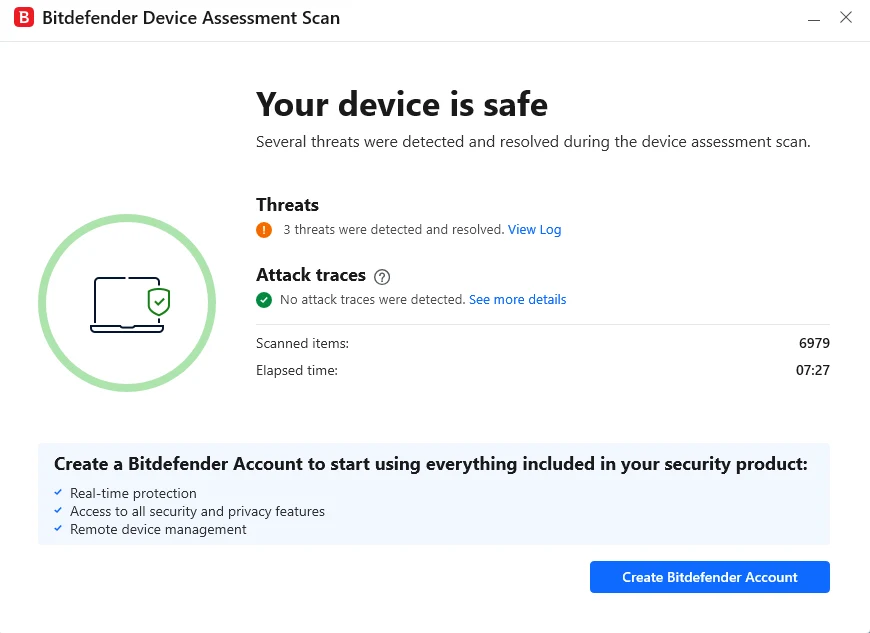
We installed Bitdefender Antivirus Free on our own Windows test PC for this comparison. Right after installation it offers a device assessment scan: it checked 6,979 items in about seven and a half minutes and found 3 threats, which it resolved automatically. In our case the flagged files belonged to an old, unsigned engineering program, a good reminder that antivirus tools also react to outdated software, not only to obvious malware.
What the Free Version Is Missing
The free app protects the PC it is installed on, but it leaves out several layers that matter in real attacks:
- Ransomware remediation. Paid plans keep protected copies of files and can restore them if ransomware still manages to encrypt something. The free version can only try to stop the attack.
- Firewall. Bitdefender Free relies on the built-in Windows Firewall. Total Security and higher plans add Bitdefender’s own firewall.
- Safepay. A separate, locked-down browser for online banking and payments. Not available in Free.
- Vulnerability scan. Paid plans check for missing Windows updates, weak Wi-Fi settings and outdated apps.
- Anti-tracking and privacy tools, including webcam and microphone protection on higher plans.
- Password manager and VPN. The VPN in Free is only a trial; the password manager is a paid feature.
- Other devices. Free covers one Windows PC only. There is no free Bitdefender for Mac or iPhone in the same package.
- Parental controls on the family plans.
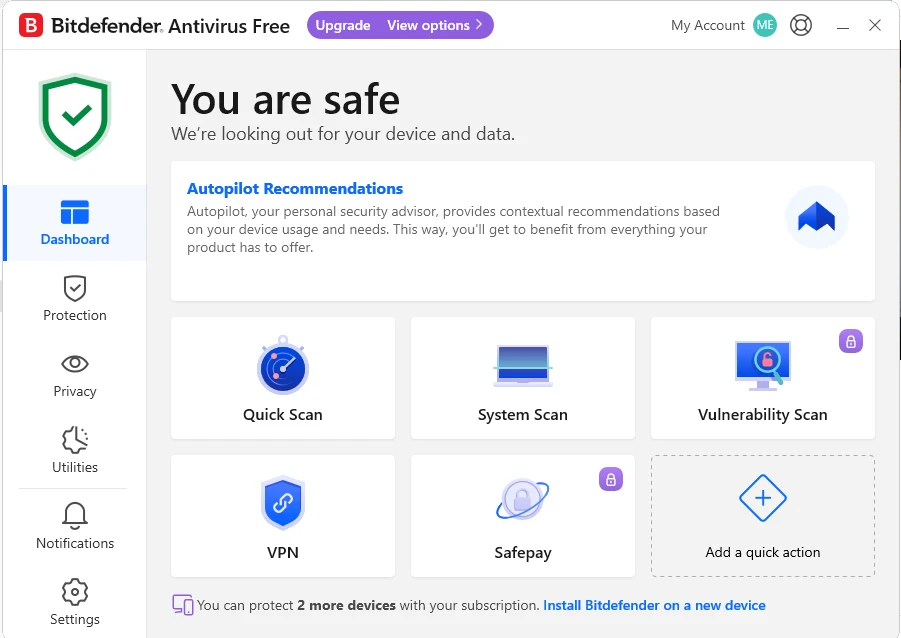
You can see the limits right on the free dashboard: Vulnerability Scan and Safepay carry a lock icon, and clicking them opens an upgrade offer.
If a ransomware attack worries you most, the gap is real. Windows has a free extra layer you can turn on today: see our guide to Bitdefender vs Windows Defender, where we explain Controlled folder access, which is off by default.
Is the Protection the Same?
For pure malware detection, the gap between free and paid is small. Both use the same engine and the same cloud threat data, so a known virus is caught just as fast by either version. Independent labs mostly test the paid suites: in AV-TEST’s August 2026 Windows 11 test, Bitdefender Total Security scored 6 out of 6 for protection, performance and usability, and AV-Comparatives measured a 99.98% online protection rate in its September 2026 malware test.
Where the paid plans pull ahead is defense in depth. If something slips past the scanner, a paid plan still has ransomware file recovery, a firewall, Safepay and a vulnerability scanner to limit the damage. The free version has nothing behind the scanner.
Already worried that your computer might be infected? Run the free checks in our guide on how to check if your PC or laptop has a virus before you install anything new.
Bitdefender Paid Plans Compared
| Plan | Devices | What it adds |
|---|---|---|
| Antivirus Free | 1 Windows PC | Real-time scanning, basic ransomware protection |
| Antivirus Plus | 1 or 3 | Ransomware remediation, Safepay, scam protection, data breach alerts, VPN with a daily cap |
| Total Security | 5 | Everything in Antivirus Plus, plus firewall, password manager, optimization tools, Mac/Android/iOS apps |
| Premium Security | 5 | Everything in Total Security, plus unlimited VPN, ad blocker and stronger scam protection |
| Family plans | Up to 25 | Same features shared across a household, plus parental controls |
For most home users, the real choice is between Antivirus Plus (one person, mainly Windows) and Total Security (one person or a couple with a PC and phones). Premium Security only makes sense if you would otherwise pay for a separate VPN.
Not sure which plan to pick? Compare Antivirus Plus, Total Security and Premium Security side by side on Bitdefender’s site.
Affiliate link: AnyShop may earn a commission if you buy, at no extra cost to you.
Bitdefender Price in 2026
Bitdefender prices change often and depend on your country, but the pattern is always the same: a large discount on the first year, then a higher renewal price. These were typical US first-year prices in November 2026:
| Plan | Typical first-year price | Renewal |
|---|---|---|
| Antivirus Free | $0 | $0 |
| Antivirus Plus | About $25–$30 | About 2× the first year |
| Total Security | About $60 | About 1.8× the first year |
| Premium Security | About $80 | About 1.6× the first year |
Two tips to pay less: buy during a promotion (Bitdefender runs them almost every month), and set a reminder a few days before renewal so you can decide whether to renew, switch plans or turn off auto-renewal.
Who Can Stay on Bitdefender Free
- You have one Windows PC and protect your phone separately.
- You keep Windows updated and download software only from official websites (see our checklist on how to download software safely).
- You back up important files to the cloud or an external drive, so ransomware recovery matters less.
- You already use a password manager and do not need a VPN.
Who Should Upgrade
- You bank, shop or pay bills on your PC. Safepay and stronger scam protection are worth it.
- You have several devices. One Total Security subscription covers Windows, Mac, Android and iPhone.
- You have important files and no backup. Ransomware remediation can save photos and documents.
- You share the computer with family members who click on everything. Extra layers matter more than the scanner alone.
- You want a firewall and password manager in one place instead of separate apps.
How to Upgrade Without Losing Protection
- Buy the plan on Bitdefender’s official website and sign in with the same Bitdefender account you use for Free.
- Uninstall Bitdefender Antivirus Free from Settings, Apps. Do not run two antivirus programs at once.
- Download the paid installer from your Bitdefender Central account and install it.
- Run a System Scan once the installation is finished, then check that ransomware remediation and Safepay are turned on.
- Install the mobile apps from Bitdefender Central if your plan covers your phone.
Frequently Asked Questions
Is Bitdefender Free really free?
Yes. Bitdefender Antivirus Free has no time limit and no payment details are needed. You only need to create a free Bitdefender account to activate it. The app shows upgrade prompts for locked features, but the core protection keeps working.
Is Bitdefender Free as good as the paid version?
For detecting known malware, almost. It uses the same engine as the paid plans. The difference is in the extra layers: ransomware file recovery, firewall, Safepay, vulnerability scanning and protection for other devices are only in the paid plans.
Is Bitdefender Free better than Windows Defender?
Both offer strong protection on Windows. Bitdefender Free is lighter on extras than Windows Security, which already includes a firewall and Controlled folder access. Our full Bitdefender vs Windows Defender comparison explains where each one wins.
Can I use Bitdefender Free on Mac or Android?
Bitdefender Antivirus Free covers Windows PCs. For Mac, Android or iPhone, you need a paid plan such as Antivirus Plus or Total Security, which include apps for all four platforms.
What is the cheapest paid Bitdefender plan?
Antivirus Plus is the cheapest paid plan. It adds ransomware remediation, Safepay and scam protection. Remember that the renewal price is usually about double the first-year price.
Final Verdict
Bitdefender Free is one of the best free antivirus programs you can install on a single Windows PC, because it shares its detection engine with the paid suites. But it is only a scanner. If you bank online, have more than one device, or would lose important files to ransomware, a paid plan adds the layers that protect you when something gets past the scanner. For most home users, Total Security is the best value because it covers your PC and your phone in one subscription.
Ready to upgrade? Get Bitdefender’s first-year discount on the official website.
Affiliate link: AnyShop may earn a commission if you buy, at no extra cost to you.